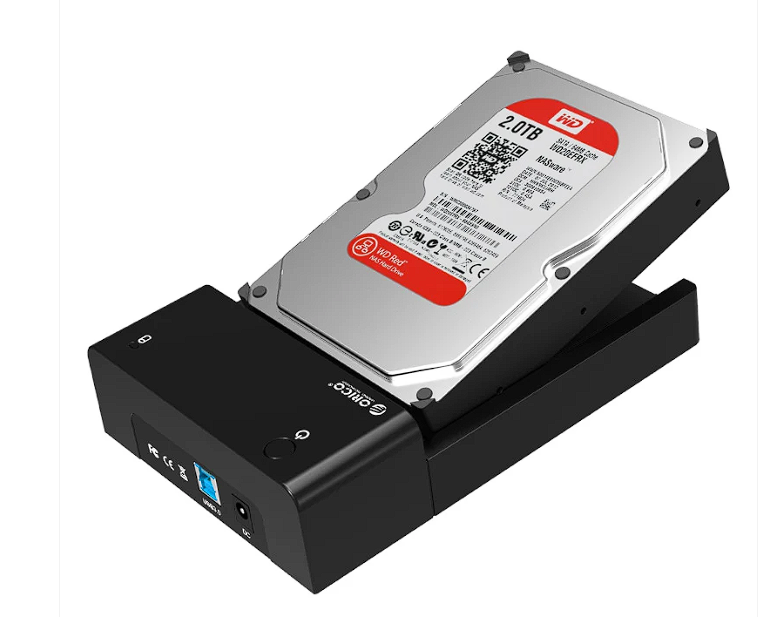

HDD enclosures provide a practical way to connect compatible internal hard drives to computers through an external interface. They house the drive, help protect it during everyday use, and allow users to access stored documents, photos, videos, and other files without installing the drive inside a computer. Available in different sizes and connection types, HDD enclosures can support home storage, office tasks, backups, and file transfers. Explore the HDD Enclosures range to find options suited to your storage setup.
What Are HDD Enclosures?
An HDD enclosure is a case designed to hold a compatible hard disk drive and connect it to a computer or another supported device. Inside the enclosure, a connector and controller allow the drive to communicate through an external connection, commonly USB.
Instead of installing a compatible internal drive inside a desktop computer, users can place it in an enclosure and access its files externally. This can be useful when upgrading a computer, reusing a spare drive, or creating additional storage for personal and work files.
Enclosures differ in drive size, supported interfaces, power requirements, materials, and installation methods. Before choosing one, check the specifications of your hard drive and the device you plan to connect it to.
Key Features & Benefits of HDD Enclosures
External Drive Access: Connect a compatible internal hard drive to a supported computer through an external interface.
Convenient File Transfers: Move documents, photos, videos, and other files between compatible devices.
Additional Storage: Make use of a spare drive without installing it inside a computer.
Protective Housing: Enclose the drive to help reduce exposure to dust and accidental contact during normal use.
Portable Storage Options: Compact models can be convenient for carrying compatible drives between locations.
Different Drive Sizes: Choose an enclosure designed for a compatible 2.5-inch or 3.5-inch drive.
USB Connectivity: Many enclosures use USB connections for access through supported computers.
Flexible Installation: Selected models offer tool-free installation, while others require screws or mounting hardware.
Backup Support: Use a compatible enclosed drive as a destination for file backups.
Reusable Hardware: Repurpose a working internal drive after upgrading or replacing computer storage.
Different Types of HDD Enclosures
2.5-Inch HDD Enclosures: These compact enclosures are designed for compatible laptop-sized hard drives. Many models can draw power from the connected USB port, depending on the drive and enclosure specifications.
3.5-Inch HDD Enclosures: Designed for larger desktop hard drives, these enclosures generally require an external power adapter. Check the power requirements and supported drive capacity before purchasing.
USB HDD Enclosures: These models connect to a compatible computer through USB. Available connection types and transfer speeds vary, so check whether the enclosure supports the ports and USB standards on your device.
Tool-Free HDD Enclosures: Selected models allow users to install or remove a compatible drive without a screwdriver. This design can make setup more convenient, particularly when drives need to be changed occasionally.
Multi-Drive Enclosures: These units accommodate more than one drive and can provide centralized storage. Depending on the model, they may support individual drive access or specific RAID configurations. Verify the supported modes and setup requirements before use.
Aluminum HDD Enclosures: Some enclosures use aluminum housing for structural support and heat dissipation. Actual thermal performance depends on the design, ventilation, drive activity, and surrounding conditions.
Everyday Uses for HDD Enclosures
HDD enclosures can support several common storage tasks at home, in offices, and in compatible computing environments.
For personal use, an enclosure can provide access to a spare drive containing photos, videos, music, and documents. It can also serve as an additional storage device for files that do not need to remain on a computer's main drive.
For work, an enclosed drive can help transfer project files between compatible computers and provide a destination for routine backups. Users who replace a computer's internal drive may also use an enclosure to access the old drive, provided the drive is functional and the connection is compatible.
Enclosures can be useful for organizing digital files, but they are not a substitute for a complete backup strategy. Important information should be stored in more than one secure location to reduce the risk of losing access to it.
How to Choose the Right HDD Enclosure
Consider these factors before purchasing an enclosure:
Drive Size: Confirm whether your hard drive is a 2.5-inch or 3.5-inch model.
Drive Interface: Check that the enclosure supports the drive's interface, such as SATA. Do not assume an enclosure designed for one drive type supports another.
USB Connection: Match the enclosure's connector and supported USB standard to your computer.
Power Requirements: Confirm whether the drive can operate through USB power or needs a separate power adapter.
Supported Capacity: Check the enclosure's stated maximum drive capacity and compatibility requirements.
Transfer Speed: Compare the enclosure's supported interface speed with the drive and computer capabilities.
Installation Method: Choose between tool-free installation and models that require screws or other mounting hardware.
Operating System: Verify compatibility with your computer's operating system.
Build and Ventilation: Consider the housing material, ventilation, and heat management for your intended use.
Warranty and Budget: Review the product specifications, warranty terms, and overall value before making a decision.
Remember that an enclosure does not automatically increase a hard drive's storage capacity or speed. Actual performance depends on the drive, enclosure controller, connection, computer, and other technical factors.
HDD Enclosure Care and Maintenance
Handle hard drives carefully because they contain sensitive components. Place the enclosure on a stable surface and avoid dropping, shaking, or moving a mechanical hard drive while it is operating.
Use the supplied or manufacturer-recommended cables and power adapter. Keep ventilation openings clear, avoid exposing the enclosure to moisture, and follow the manufacturer's instructions for installation and cleaning.
Before disconnecting an external drive, use the operating system's safe-ejection feature when available. This helps reduce the risk of interrupted file operations and data corruption.
If a drive is not recognized, check the cable, power connection, compatibility, and operating system settings. Avoid formatting or initializing a drive that contains important files you have not backed up, as these actions can affect access to existing data.
Explore HDD Enclosures at Global Swanky
The right HDD enclosure can make compatible internal storage easier to access, reuse, and organize. By checking drive size, interface, power requirements, and connection speed, you can choose an enclosure that fits your everyday storage needs.
Explore the HDD Enclosures range for external storage accessories, and visit Global Swanky to discover more electronics and everyday essentials.
Frequently Asked Questions About HDD Enclosures
What Is an HDD Enclosure Used For?
An HDD enclosure holds a compatible internal hard drive and connects it to a computer through an external interface. It can be used to access files, transfer data, reuse spare drives, and support backup routines.
Can I Use an Old Laptop Hard Drive in an HDD Enclosure?
Yes, if the drive is functional and the enclosure supports its physical size and interface. Many laptop-sized drives use a 2.5-inch SATA connection, but you should verify the exact drive specifications before purchasing.
Do HDD Enclosures Need an External Power Supply?
It depends on the enclosure and drive. Many 2.5-inch enclosures can draw power through USB, while 3.5-inch desktop hard drives generally require a separate power adapter. Always check the manufacturer's requirements.
Does an HDD Enclosure Increase Data Transfer Speed?
Not necessarily. The enclosure provides an external connection, but transfer speed depends on the hard drive, enclosure controller, USB standard, cable, and connected computer.
How Do I Choose the Correct HDD Enclosure?
Check your drive's physical size, interface, power needs, and capacity. Then compare these details with the enclosure's supported specifications, connector type, operating system compatibility, and installation requirements.

|
"Consumer Reviews on Companies, Products and Services" |
HDD Enclosures for Convenient Storage, Protection, and Data Access
HDD Enclosures for Convenient Storage, Protection, and Data Access Reviews
Write a Review for HDD Enclosures for Convenient Storage, Protection, and Data Access |
RECENTLY UPDATED REVIEWS
Redemption Roofing AZ
Premier Turf Farms
Pressure Wash Web Design
Appreciated the friendly service and straightforward advice.
QC Spa
Description
Signature LVT Flooring Specialists Ltd
Florida Pest Management Associates
HDD Enclosures for Convenient Storage, Protection, and Data Access
REQUESTED REVIEWSREVIEWS BY CATEGORY |